Learn how to unfollow facebook friends strategically to refresh your feed, boost engagement, and connect with your ideal audience.
FriendFilter scans your Facebook and shows exactly who's inactive — so you can clean up and boost your reach.
Hey there! If you're a coach, marketer, or business owner using your Facebook profile to grow your brand, you know how frustrating it can be to post something amazing and hear... crickets. Unfollowing people on Facebook isn't about being rude; it’s a smart, strategic move to clean up your feed and get the algorithm working for you, not against you.
Think of it as spring cleaning for your audience. When you curate a friends list of people who actually care about what you post, you're sending a powerful signal to Facebook that your content is valuable and worth showing to more people. Let's dive into how you can make this happen.
Have you ever posted something you were really proud of—maybe a new offer, a big client win, or a helpful tip—only to be met with digital silence? That quiet is often less about your content and more about a bloated friends list.
For many of us using a personal profile for business, hitting that 5,000 friend limit feels like a huge win. But in reality, it's often just a vanity metric that's quietly strangling your organic reach.
Here’s the deal: Facebook tests your post with a small slice of your friends first. If that group doesn't engage—no likes, comments, or shares—the algorithm assumes your post is a dud and stops showing it to others. When a huge chunk of your friends list is made up of inactive or irrelevant accounts, they become dead weight, tanking your engagement and hiding your content from the people you actually want to reach.
It’s time for a mindset shift. The goal isn't to have the most friends; it's to have the right friends. This means you stop being a collector and start being a strategic curator of your online community. Every inactive friend is just taking up a valuable slot that could be filled by someone genuinely interested in what you have to say.
Your Facebook profile isn't just a social page; it's a powerful marketing tool. Keeping your audience clean and engaged is as crucial as maintaining your business website.
This is more important than ever. The average time people spend on Facebook daily has cratered, dropping from 58 minutes to just 30. With users spending almost 50% less time on the app, you’re fighting a much tougher battle for their attention. This massive drop in engagement is exactly why a lean, active network is no longer a "nice-to-have"—it's a necessity. You can read more about these social media usage patterns.
Pruning your friends list is one of the quickest ways to make the algorithm your best friend. When you remove disengaged connections, you immediately increase the chances that your posts will land in front of people who will actually interact with them. This kicks off a powerful positive feedback loop:
Deciding to unfollow Facebook friends who aren't engaged isn't personal; it's a smart business move. It’s the first real step toward building a smaller but far more powerful community that actually drives conversations, leads, and sales.
Ready to transition from a collector of random contacts to the curator of an active community? You'll need a solid plan. A friend audit isn't about being ruthless; it's a strategic move to ensure your message lands with people who care. This means taking an honest look at your friends list to see who’s boosting your reach and who’s holding it back.
Imagine your Facebook profile is a room where you're giving a presentation. If half the people are asleep or scrolling on their phones, the energy dies and your message falls flat. The same thing happens online—you need an engaged audience to build momentum.
This decision tree gives you a simple framework for thinking about your reach. If it’s not where you want it to be, the first place to look is the quality of your audience.
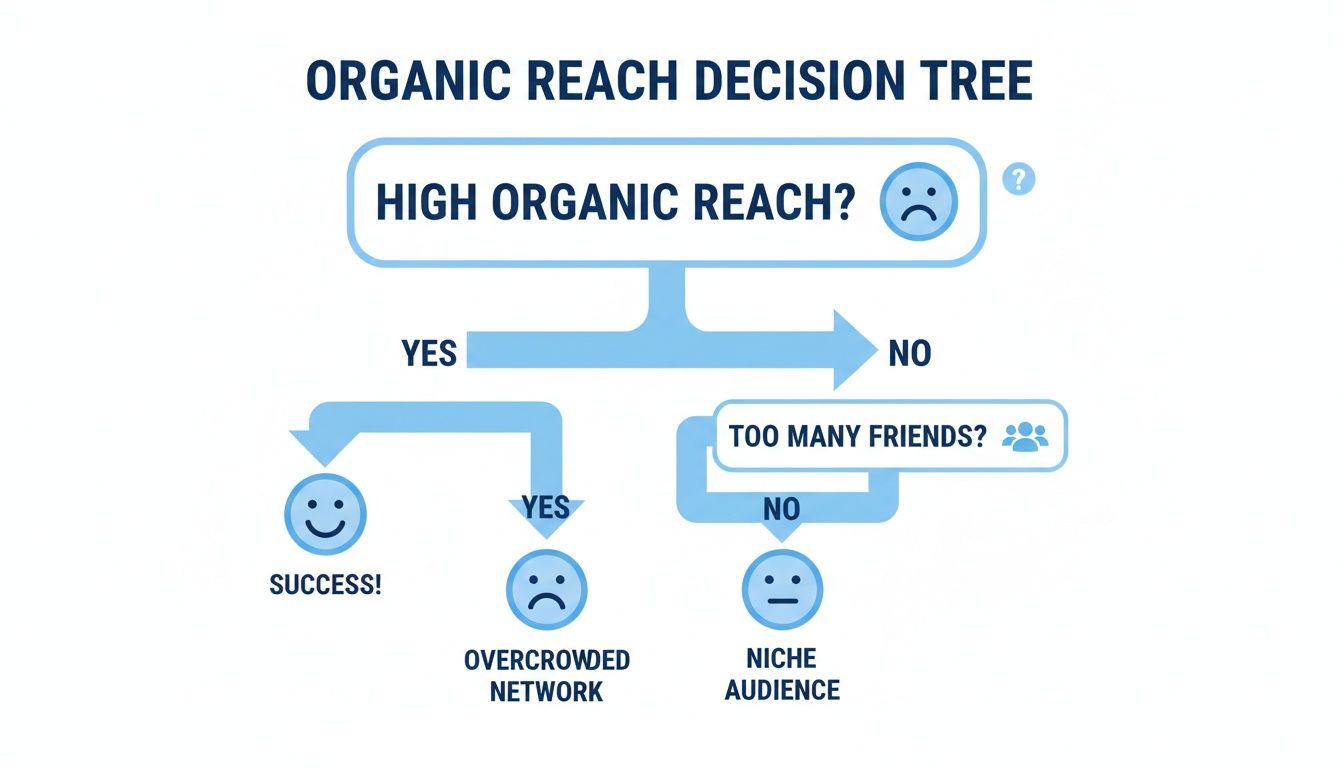
As you can see, low organic reach naturally leads us to question our network. Are the right people in our audience? Are there too many inactive accounts? This is where the audit begins.
The first step is to categorize your connections. Once you break down your friends list into these groups, the decision to unfollow Facebook friends becomes less personal and much more practical.
Here are the main types of accounts to look for:
Think of it this way: Every inactive friend is taking up a slot that a potential client, a future collaborator, or a genuine advocate could fill. You only have so many seats in your digital "room"—make every single one of them count.
Use this quick reference guide to decide which friends help your engagement and which might be harming your reach.
This checklist isn't about being cold; it's a business-minded approach to building a valuable network on a platform that demands it.
Beyond inactivity, you also have to watch out for fake profiles and bot accounts. These provide zero value and can even introduce security risks. The scale of this is massive; in just one recent quarter, Facebook took action on 698 million fake accounts. Over a full year, that number exploded to over 3 billion! You can dig into more of these numbers on Statista's report on Facebook's battle with fake accounts.
These accounts tend to have some common red flags:
Clearing these accounts from your list is an easy win. It’s a powerful way to clean up your audience and show the algorithm you’re maintaining a high-quality, authentic network.
With these categories in mind, you can build a simple checklist to guide your audit. It’s less about rigid rules and more about a consistent framework for making decisions. The end goal is to cultivate an engaged, relevant, and genuine community. For a more detailed walkthrough, check out our guide on how to filter friends on Facebook for better engagement. This systematic approach turns a daunting task into a manageable—and incredibly valuable—process.
If you prefer a hands-on approach or just need to tidy up a smaller friends list, doing it manually gives you total control. It's a great way to start and see an immediate difference in your News Feed.
Best of all, it’s completely discreet. Facebook won't send a notification when you unfollow someone, so you can curate your feed without any awkwardness.
This method is super straightforward and works on both your computer and phone. Let's walk through it.

When you’re at your computer, you’ve got a couple of easy ways to unfollow Facebook friends. The first is perfect for when a post pops up in your feed.
The second option works better when you have someone specific in mind.
This manual control is ideal for targeted cleanups. It’s the digital equivalent of politely stepping away from a conversation that isn’t serving you, allowing you to curate your space without causing any drama.
The process is just as simple on your phone, so you can manage your feed whenever you have a spare moment.
Just like on a desktop, you can act directly from your News Feed or their profile.
Taking these small steps gives you back control over what you consume online. It helps protect your mental energy and keeps your feed focused. If you're curious about why this is so critical, our guide on cleaning inactive friends offers some great context.
While doing it by hand is effective, it has one major drawback: it doesn’t scale.
Imagine you’re a coach with 4,000 friends. Manually sifting through each profile could take dozens of hours. That's time you could be spending creating content, talking to clients, or actually running your business.
This hands-on approach is a fantastic starting point for a small cleanup. But for any serious marketer looking to optimize their audience efficiently, it quickly becomes an overwhelming chore. This is where a smarter, faster way comes in. For a look at strategies that can analyze engagement data automatically, you can check out our mass delete guide.
Manually sifting through your friends list isn't a practical long-term strategy, especially when you’re running a business. Every hour you spend trying to remember the last time someone engaged is an hour you could have spent talking to actual clients.
This is where a smarter, data-driven approach changes the game.
What if, instead of guessing, you could see a clear list of everyone who hasn't engaged with your posts in the last 30, 60, or even 180 days? That's the power of an inactivity scanner. Tools like FriendFilter work like an audience management system, giving you clear, actionable data.
FriendFilter is a Chrome extension that analyzes your audience's engagement—the likes, comments, and reactions on your posts. It doesn't just give you a list of names; it shows you who is digitally silent in your community. You can set your own inactivity window and instantly get a report of everyone who falls below that threshold.
This is a massive upgrade from a manual audit. You’re no longer making decisions based on emotion or a fuzzy memory. You're letting the numbers do the talking.
When you unfollow Facebook friends based on real engagement data, the process becomes strategic, not personal. You're simply tidying up your audience to make sure your message reaches people who are actually listening.
This targeted cleanup has a direct effect on your organic reach. When you remove the dead weight, you immediately improve your engagement-to-friend ratio. That sends a powerful signal to the Facebook algorithm that your content is valuable. For those who want to explore beyond manual methods, tools like lunabloomai's app can also offer some robust features for managing your friend list.
Of course, not every valuable connection is a loud one. Some of your most important contacts—high-ticket clients, promising leads, or close family—are often quiet observers. You definitely want to keep them in your network.
This is where a Whitelist feature is a lifesaver. Think of a whitelist as your "do not touch" list.
Before you run any cleanup, you can add these crucial contacts to a protected group. FriendFilter will then automatically exclude them from any inactivity scan or bulk unfollow action. It gives you the confidence to clean your list at scale without that nagging fear of accidentally removing someone important.
An inactivity scanner does more than just help you unfollow Facebook friends. It gives you a much deeper understanding of your audience, which is gold for any marketer.
For instance, Facebook's user base is huge in certain markets. In the United States alone, there are over 250 million active users. In the UK, a massive 81% of the population is on the platform. If you're targeting these areas, knowing who in your network fits your ideal customer profile is a massive strategic advantage.
A tool like FriendFilter helps you see who your most engaged followers are, allowing you to double down on building those relationships.
Here’s what this data-first approach delivers:
Automating your friend audit isn't about cutting corners; it's about being efficient. For those ready to tackle a major cleanup, our guide on how to mass delete friends on Facebook offers a deeper dive into the process.
You’ve done the heavy lifting and cleaned out your friends list. Awesome! But the real work isn’t just that initial purge; it’s about maintaining a high-quality, engaged community for the long haul. Think of it as an ongoing practice that keeps your audience healthy and your organic reach high.
I like to compare it to tending a garden. You can’t just pull the weeds once and expect a perfect plot forever. You have to keep nurturing the plants you want to grow and consistently pull new weeds. Your Facebook audience is no different.
To stop your friends list from getting bloated again, you need a regular maintenance schedule. Based on my experience with marketers and coaches, running a friend audit once every quarter (every 90 days) is the sweet spot.
This simple routine does two critical things:
Your Facebook profile isn't just another social page; it's your digital storefront. Keep it clean, welcoming, and open for business with the right people.
Go ahead and set a recurring calendar reminder for your "Facebook Friend Audit." It’s one of the simplest and most effective habits you can build. It’s also worth knowing if Facebook deletes inactive accounts on its own (spoiler: it's complicated).
The single biggest mindset shift is to stop chasing a high friend count. Hitting the 5,000-friend limit isn't a trophy; it's a ceiling. A smaller, highly engaged audience of 500 ideal clients is infinitely more valuable than 5,000 disengaged strangers.
This change impacts how you handle new friend requests.
Instead of mindlessly hitting "accept," get more selective. Before adding someone, ask yourself:
Start treating each friend slot as valuable digital real estate. For more tips on making room for new connections, check out our guide on how to mass delete friends.
Once your audience is curated, the next step is to nurture it. A clean friends list is the foundation, but genuine engagement is what builds the house. You have to move beyond just broadcasting and start fostering a two-way conversation.
It's not enough to just unfollow Facebook friends who are inactive; you have to give the active ones a reason to stick around.
Here are a few practical ways to do that:
This approach transforms your profile from a broadcast channel into a thriving community hub where you're seen as a go-to resource. You can dig deeper into audience management with our guide on how to filter friends on Facebook.
You've got the why and the how, but a few questions might still be bouncing around. That's totally normal! Let's tackle the most common concerns I hear from marketers and business owners so you can move forward with confidence.
Think of this as your final gut-check before you dive in.
This is the big one! The short answer is a resounding no. Facebook does not send a notification when you unfollow someone. They won't get a "Jane Doe has unfollowed you" alert—nothing like that.
They'll still be on your friends list and you can still message each other. The only thing that changes is their posts vanish from your News Feed. It’s a completely discreet way to curate what you see without causing any drama.
It's so important to get this right because these two actions have completely different outcomes.
Here's how I think about it: Unfollowing is like politely stepping out of a noisy room to focus. Unfriending is leaving the party altogether. For strategic networking, unfollowing gives you control without burning any bridges.
Yes, it's absolutely safe—if you choose the right tool. The key is finding a service that works within your browser and never asks for your login credentials.
A tool like FriendFilter, for example, runs as a Chrome extension. This is a critical detail because it means the software operates locally on your own computer. It never needs your Facebook password. It's also designed to mimic how a real person would behave, performing actions at a natural pace to avoid tripping Facebook's security alarms. This approach keeps your account safe.
Building an engaged audience isn't a "set it and forget it" task. For active marketers, coaches, or anyone using their personal profile for business, a great rhythm is to perform a friends list audit every 3 to 6 months.
This regular check-in stops your list from getting bloated with inactive contacts and ensures your audience stays aligned with your current business goals. It's the secret to keeping your engagement high. For more context on why these cleanups are so crucial, you can learn more about if Facebook deletes inactive accounts on its own.
Ready to stop guessing and start getting real results from your Facebook efforts? FriendFilter gives you the data-driven tools you need to clean your friends list, boost your engagement, and turn your profile into a powerful lead-generation machine. Ditch the manual work and let our smart inactivity scanner do the heavy lifting for you.
