Learn how to unfriend a friend on Facebook on desktop and mobile. This guide covers alternatives, bulk options, and tips for cleaning your friends list.

FriendFilter scans your Facebook and shows exactly who's inactive — so you can clean up and boost your reach.
Hey there, Facebook marketers, coaches, and small business owners! If you’re using your personal profile for business, learning how to unfriend a friend on Facebook isn't just digital housekeeping—it's one of the smartest strategic moves you can make for your organic marketing. This isn’t about being rude; it's about curating an audience that's genuinely interested in what you have to say.
Think of it as tending to your digital garden. You need to pull the weeds to let the flowers grow.
Let’s get real for a second. Scroll through your news feed. How many updates do you see from people you haven’t spoken to in a decade? For an entrepreneur, that’s not just a minor annoyance—it’s actively hurting your business. A bloated friends list filled with inactive connections means your carefully crafted posts are being shown to an audience that simply doesn't care.
This sends a crystal-clear signal to the Facebook algorithm: your content isn't engaging. The result? Your organic reach gets throttled, and your message never reaches the people who need to hear it.
This isn’t just a hunch. For example, a business coach with 4,000 friends might find that a staggering 70% of them haven’t liked or commented on anything they've posted in over a year. That’s the reality for many of us. Those inactive friends are essentially dead weight, dragging down your engagement metrics.
Plus, Facebook itself acted on over 1.1 billion fake accounts in just one quarter. It’s a safe bet that some of those ghost profiles are cluttering up your friends list right now, diluting real engagement and killing your reach.
The goal isn't just to randomly remove people. It’s to cultivate a powerful, targeted audience that actually wants to hear from you. Every inactive or irrelevant friend on your list is a spot that could be filled by a potential client, a valuable referral partner, or an engaged supporter.
Your Facebook friends list isn't a popularity contest; it's your primary marketing audience. Every person on that list should either be a potential client, a supportive peer, or a genuine personal connection.
When you clean up your list, you naturally improve your engagement-to-friend ratio—a key metric the algorithm pays close attention to. A higher ratio tells Facebook your content is valuable, which means you get better visibility.
The critical first step is moving from "how do I unfriend people?" to "why I must unfriend them." This mental shift is what will finally help you reclaim your organic reach. For a deeper look into this strategy, check out our guide on how to properly manage your Facebook friend list for real results.
So, you're ready to start cleaning up your friends list to boost that organic reach. Smart move. Let's get down to the nitty-gritty of how it's actually done.
Knowing exactly where to click makes the process a lot faster, whether you're at your desk or scrolling on your phone.
When you're at your desktop, removing a friend takes just a couple of clicks. It's super simple.
First, navigate to the profile of the person you want to unfriend. Right below their cover photo, you'll spot a button that says Friends, complete with a little person icon.
Give that button a click. A small menu will drop down, and at the very bottom, you'll see the Unfriend option. Click it, confirm your choice, and you're done. The connection is severed, and they won't receive any notification about it.
Doing this on the go is just as easy.
Open up the Facebook app and head to the person's profile. You'll see the same Friends button right under their name.
Tap it, and a menu will slide up from the bottom of your screen. Hit Unfriend, confirm, and that’s it. It’s a quick and painless way to manage your connections from anywhere.
A Quick Reality Check: While this manual method is fine for removing one or two people, it’s a massive time sink if you’re trying to clear out dozens—or even hundreds—of inactive profiles. This is where tools like FriendFilter's engagement scan become invaluable, doing the heavy lifting by flagging friends who never interact with your posts.
And this idea of a digital cleanup isn't just for Facebook. If you're looking to apply the same strategy elsewhere, it's worth learning how to unfollow multiple people on Instagram without raising red flags.
Hitting the 'unfriend' button can sometimes feel a bit drastic. We've all been there—hovering over the button, wondering if it's the right move for a professional contact, a client, or even that distant relative who floods your feed with cat memes. Before you cut ties completely, it's worth knowing about the other tools Facebook gives you.
These options are all about setting boundaries and curating your digital space. Not every connection needs to be severed; some just need a different level of access.
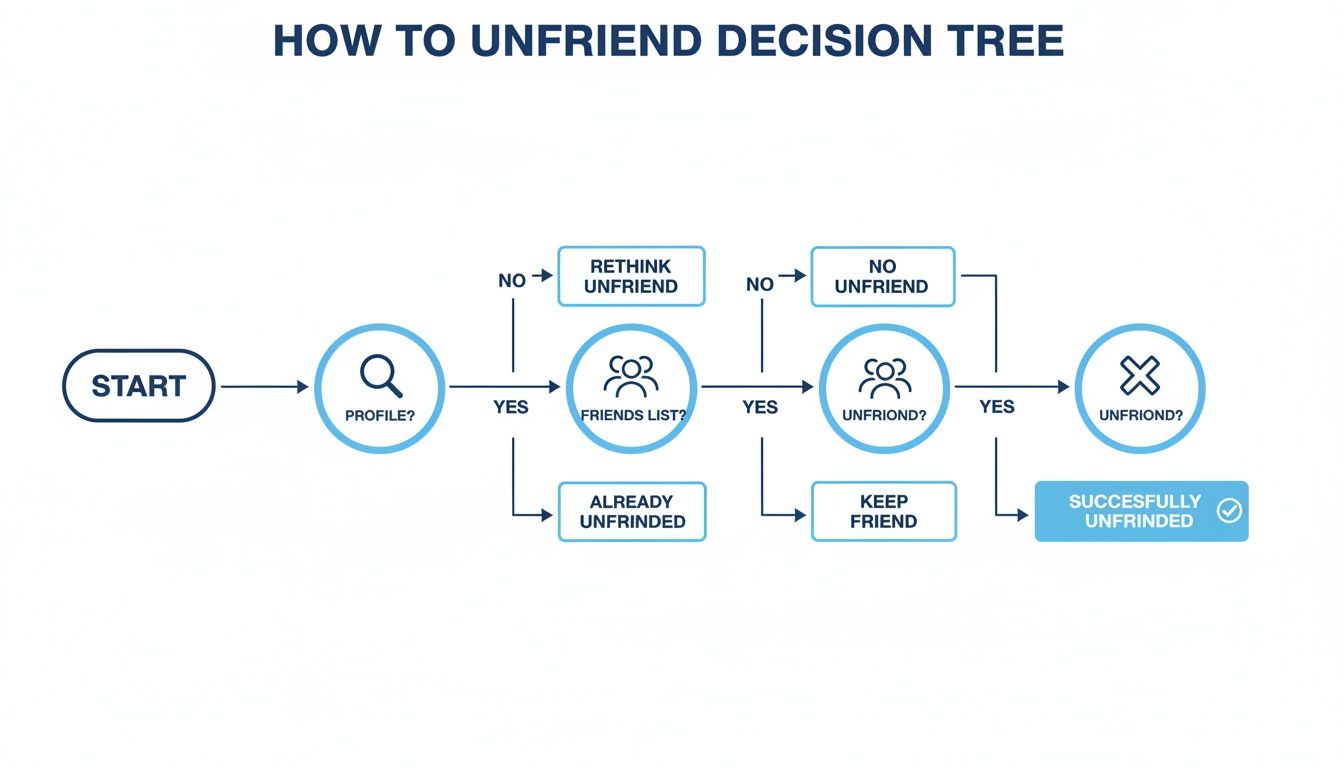
While this chart maps out the direct path, the smartest moves often happen before you take that final step. Let's break down the more nuanced options.
The Unfollow feature is a game-changer for connections who are valuable but just plain noisy. Got a business contact who posts 20 times a day about their lunch? Unfollow them. You stay friends, they can still see your posts, but their content vanishes from your feed. It's an instant declutter button.
Think of the Restrict feature as putting someone on an information diet. When you add a friend to your Restricted List, they can only see your public information and any posts you specifically tag them in. Your personal family photos and weekend updates? Invisible to them.
This is the perfect solution for maintaining a professional front with clients or acquaintances you've friended out of obligation. You keep the connection without oversharing.
It’s a powerful way to manage your privacy without any of the potential awkwardness that comes with unfriending. You can even take this further and filter friends on Facebook into custom lists for even more precise control over who sees what.
Facebook's Take a Break option is designed for those tricky situations, like after a breakup or a fallout with a friend. It's a temporary measure that lets you cool off without making a permanent decision.
When you take a break from someone, you can choose to:
It's a fantastic, low-drama way to get some space. They aren't notified, and you can reverse the settings anytime you feel ready to reconnect.
When all else fails, Blocking is the most definitive action you can take. This isn't just unfriending; it completely severs all ties on the platform.
The person you block won't be able to:
Reserve this for situations involving harassment, spam, or anyone you want zero future interaction with. It’s a clean, complete, and permanent break.
Deciding which action to take can be confusing. This table breaks it down so you can quickly choose the best option for your situation, whether you're trying to clean up your feed, protect your privacy, or end a connection for good.
Ultimately, using these tools strategically helps you build a better, more intentional experience on Facebook. You get to decide who sees your life and whose updates you see—all without burning bridges unnecessarily.
It’s easy to think of a large friends list as a sign of success, but when it comes to business, the opposite is often true. Facebook's algorithm is all about engagement. When your list is full of inactive accounts, it tells the algorithm that your content isn't hitting the mark.
The result? Your organic reach tanks. Your posts get buried, hidden even from the people who actually want to see them. For anyone using Facebook for business—coaches, marketers, entrepreneurs—every inactive friend is a missed opportunity. It’s like presenting to an empty room while the algorithm takes notes.
Let's talk numbers. Your engagement ratio, which is the percentage of friends who actually interact with your posts, is what really matters. A focused list of 500 friends with 100 genuinely engaged followers is infinitely more powerful than a bloated list of 5,000 with that same handful of active people.
A smaller, more engaged audience will always outperform a large, silent one. Quality over quantity is the name of the game for organic reach on Facebook.
This isn't just a hunch; it's a core principle of how the platform works. The problem of stale connections is so significant that Mark Zuckerberg once considered a radical internal proposal: wiping everyone’s friend connections to force a refresh. You can read the fascinating story on Zuckerberg’s bold proposal on TechCrunch.com.
Though they never pulled the trigger, the logic holds up. Oversized, outdated friend lists are engagement killers.
Learning how to unfriend a friend on Facebook isn't about cutting people out. It's about adding value back into your audience. When your posts consistently land in front of an engaged group, the algorithm rewards you with better visibility. This simple, free strategy can transform your personal profile into a potent marketing engine. To learn more about the specifics, our guide on what happens when you unfriend someone breaks it down even further.
Let’s be honest: scrolling through hundreds, maybe even thousands, of Facebook friends to manually clean up your list is a massive time sink. As a business owner, your time is your most valuable asset. Guessing who is and isn't engaging with your content is a shot in the dark—you need real data to do the heavy lifting for you.
This is exactly why a tool like FriendFilter exists. It’s a simple Chrome extension built to turn that overwhelming chore into a streamlined, automated workflow. With a community of over 120,000 users, it's proven to help identify and remove inactive friends. In fact, our tests have shown it can boost engagement by as much as 45% for small businesses.
Think about it. Facebook has 3.07 billion monthly active users, and the average person has 338 friends. But here's the kicker: platform analytics reveal that only 20-30% of those friends actually engage with your posts. FriendFilter is designed to help you zero in on that silent majority. If you're curious about the numbers, you can dig into more of these platform statistics from Recurpost.com.
Instead of burning hours clicking through profile after profile, you can adopt a strategic process that not only saves time but also protects your most valuable connections.
FriendFilter essentially transforms your cluttered friends list into a high-performing marketing audience. It’s not just about unfriending people; it’s about making smart, informed decisions that strengthen your network.
For those looking to manage their social media presence more broadly, understanding the capabilities of top social media automation tools can extend beyond just friend list cleanups.
Even with a solid plan, a few questions always seem to pop up when it's time to clean up your Facebook friends list. Let's walk through some of the most common ones so you can feel confident about managing your network.
Nope. Facebook keeps this process quiet. They will not get a notification telling them you've removed them.
The only way they'd find out is if they specifically go looking for your profile on their friends list and notice you're gone, or if they realize they can no longer see your "friends-only" posts. It’s designed to be discreet.
If you want to get into the nitty-gritty of what happens to old posts and tags, our guide explains in full detail what happens when you unfriend someone on Facebook.
This is a big pain point. On Facebook itself, there’s no way to do this. You have to go through and remove people one by one, which is an absolute nightmare if you're trying to clear out hundreds of contacts.
That manual, time-sucking process is exactly why tools built for managing your list in bulk are so essential for busy people.
Think of it this way: unfriending is like politely showing someone the door, while blocking is locking it, bolting it, and putting a "do not enter" sign up.
Blocking is the move for situations where you need to ensure zero future contact.
A clean friends list directly impacts your engagement-to-friend ratio. When a higher percentage of your audience interacts with your posts, the Facebook algorithm sees your content as valuable and shows it to more people, boosting your organic reach.
Ready to stop guessing and start growing? FriendFilter gives you the data-driven tools to identify inactive friends, protect your VIP contacts, and automate your cleanup. Turn your cluttered friends list into a powerful marketing asset.
Start your 14-day free trial today at FriendFilter.com and see the difference for yourself.
