Refresh your Facebook experience with a practical guide to delete all friends from facebook using simple steps and trusted tools to boost your feed.
FriendFilter scans your Facebook and shows exactly who's inactive — so you can clean up and boost your reach.
Hitting the button to delete all friends from Facebook might sound extreme, but for business owners, coaches, and marketers, it can be an incredibly smart strategic reset. When your friends list is cluttered with old contacts and inactive accounts, your organic reach tanks. Your best content ends up being shown to people who couldn't care less, making it invisible to those who matter.
Think of it as a professional spring cleaning for your network. Let's walk through why this is so powerful and how you can do it without the headache.
Let's be honest, does your Facebook profile feel more like a digital graveyard than a vibrant community? For many entrepreneurs, hitting the 5,000 friend limit feels like an accomplishment, but it's often just a vanity metric. The hard truth is that Facebook's algorithm rewards engagement. When your content is pushed to thousands of people who don't interact, Facebook assumes it's low-quality and stops showing it to anyone.
This isn't just about being tidy. It's a full-on strategic move to reclaim your audience and make your marketing efforts count. The idea of starting fresh is so compelling that even Mark Zuckerberg reportedly toyed with the "potentially crazy" idea of wiping everyone's social graph to re-energize the platform. While that never happened, the lesson for us is clear: bloated friend lists are engagement killers.
A massive friend audit brings real, measurable benefits. By cutting out the dead weight, you’re sending a powerful signal to the algorithm. It's forced to show your content to a smaller, more concentrated group of people—the ones who are actually your clients, prospects, and valuable collaborators.
This focused strategy pays off in several ways:
The goal isn't to have the most friends; it's to have the right friends. A curated list of 500 engaged followers is infinitely more valuable than 5,000 silent ones.
Treating your Facebook profile like a key part of your sales funnel is a foundational element of any good social media strategy. This is a core part of the complete guide to social media optimisation. When every connection matters, a clean list ensures your product launches, webinar announcements, and lead magnets get in front of the people most likely to convert.
You can learn more about how to manage your Facebook friend list effectively for the long term. By taking control, you turn your personal profile from a social distraction into a powerful, revenue-generating tool.
It’s easy to think a massive friends list is a good thing, but in reality, a list packed with inactive or fake accounts is actively sabotaging you. It's not just a vanity metric; it directly hurts how many real people see your posts.
Here's how it works: Every time you post, Facebook shows it to a small slice of your network. If that initial group doesn't engage—no likes, no comments, no shares—the algorithm essentially gives up. It assumes your content isn't interesting and stops pushing it into more news feeds.
Imagine you're a coach launching a new program. Your big announcement gets served to hundreds of accounts that haven't been touched in years. The result? Crickets. You're left with no engagement and, more importantly, no leads. This digital dead weight is making you invisible.
The fake account problem on Facebook is almost hard to believe. In just the third quarter of 2023, the platform took action on a mind-boggling 698 million fake accounts. That's an astonishing number. You can dig into the numbers in this data report from Statista.
These accounts are designed to look like real people or businesses, but they're just noise. For a small business owner, that means your thoughtful content is fighting for visibility against an army of bots.
These profiles will never buy from you, send a referral, or share your posts. They are pure algorithmic poison. Keeping them on your friends list is like trying to sell to a room full of mannequins—a total waste of time and energy.
Even more common than outright fakes are the "ghost" followers. These are real people who simply abandoned their accounts years ago or just never log on anymore. Think of old high school acquaintances or former colleagues who have moved on from the platform.
Individually, they seem harmless. But when you have hundreds or thousands of them, they create the exact same problem as fake accounts.
You can usually spot these profiles pretty easily:
When your audience is full of disengaged accounts, your engagement rate tanks. A low engagement rate is a huge red flag to Facebook's algorithm, signaling that your content isn't valuable and kicking off a vicious cycle of lower and lower reach.
Cleaning out these inactive connections is one of the most important things you can do for your profile's health. It might seem odd to delete all friends from facebook who aren't bots, but it's essential. By removing them, you ensure your content reaches a smaller, but far more active and engaged, audience.
By the way, if you're wondering if Facebook automatically deletes inactive accounts, we've got a guide that explains exactly how that works.
Before you dive in and start purging your friends list, let’s pump the brakes for a second. Hitting "unfriend" is a one-way street, so a little bit of prep work now can save you a world of regret later. Think of this as your pre-flight checklist for a mission to delete all friends from Facebook without any collateral damage.
First, it's a great idea to back up your data. Facebook has a built-in "Download Your Information" tool that lets you grab a copy of everything, including your friends list. It's a simple safety net, giving you a complete record of your connections before you make any permanent changes.
If you're feeling overwhelmed by a cluttered network, you're not alone. It's a common reason people disengage. In fact, over the last year, 42% of Facebook users took a break from the platform for several weeks, and another 26% deleted the app from their phones. Culling your friends list is a smart way to take back control and make the platform a more valuable space for you. You can read more about why people are stepping away from Facebook and what it means.
Alright, now for the strategy. Instead of getting bogged down asking, "Who should I delete?" try flipping the script: "Who do I absolutely need to keep?" For coaches and business owners, this shift in perspective is a total game-changer.
Seriously, grab a pen and paper (or your note-taking app of choice) and start outlining what your ideal connection looks like. Ask yourself some pointed questions:
Doing this little exercise gives you a powerful filter. Suddenly, anyone who doesn't fit this profile becomes a candidate for removal. It turns what feels like a tedious chore into a focused, strategic business move. It's also one of the first things I recommend to anyone trying to improve their organic reach with a more engaged audience.
Finally, let's talk about the mental side of this. Unfriending people, even hundreds of them, can feel a bit awkward or even ruthless. But you have to remember: this isn't personal, it's business. You're not excommunicating people from your life; you're carefully curating your professional network to align with your goals.
See this cleanup not as a loss, but as an investment. You're clearing out the noise to make room for high-quality connections that will drive real results for your brand.
This is about more than just tidying up. It's about building a more intentional and powerful online presence. Every inactive or irrelevant connection you remove actually boosts the average engagement of your remaining audience, which is a huge signal to the Facebook algorithm that your content is valuable. A little prep work now sets the stage for a much more effective and profitable experience down the road.
If you prefer a hands-on, deliberate approach, manually trimming your friends list is the way to go. It’s certainly a time-consuming process, but it gives you complete control. You get to decide exactly who stays and who goes, which is perfect for ensuring you don't accidentally remove an important client or a long-lost cousin.
This method is straightforward, but it requires some serious patience, especially if your friends list is in the hundreds or thousands. Don't think of it as a one-and-done purge. It's more of a project you chip away at over time. Trust me, trying to delete all friends from Facebook in a single afternoon is a surefire way to get frustrated and could even get your account flagged by Facebook's security systems.
First, you’ll need to navigate to your full friends list. Just head to your Facebook profile and click on the “Friends” tab right under your cover photo. That's your starting point.
From there, the real work begins. For each person you want to remove:
And just like that, the connection is gone. Simple, right? The catch is repeating that process over and over. To make it less tedious, don't just start from the top. Use the search bar to find people you already know you want to remove or those who've gone inactive. We’ve got some more great tips on how to manage your Facebook friend list if you want to get more organized.
To keep your account in good standing with Facebook, don't go on an unfriending spree. The key is to work in small, controlled batches. I usually recommend setting a timer for 15-20 minutes a day and just focusing on the task.
A good rule of thumb is to stick to around 50-100 unfriends per day. This pace is slow enough that it won't look like suspicious bot activity and get your account temporarily restricted.
Pro Tip: Don't just rely on names you don't recognize. I always click through to their profile for a quick look. If their last post is from 2018, it's a pretty safe bet they're an inactive friend who's dragging down your organic reach.
Think of this manual audit as more than just a clean-up. It's a great chance to rediscover and re-engage with valuable contacts you might have forgotten about. It’s not just about deleting; it’s about curating a network of people who matter. If you want to learn more, check out our guide on increasing your organic reach. And if you're wondering what happens after you unfriend someone, we've got that covered too.
Let's be realistic. Manually unfriending hundreds, or even thousands, of people is a project few have time for. If you're a coach with a 5,000-person list gearing up for a big launch, the manual method just isn't an option. This is where a smart tool becomes less of a convenience and more of a strategic necessity to delete all friends from Facebook effectively.
Instead of losing days to mind-numbing clicking, you can use a specialized tool to handle the process safely and automatically. A platform like FriendFilter, which works as a simple Chrome extension, does all the heavy lifting while keeping your account secure. It’s built with 256-bit encryption and designed to operate well within Facebook's guidelines, so you can clean up your list without risking your profile.
Before you start deleting anyone, a good tool helps you figure out who to delete. FriendFilter, for instance, kicks things off with an engagement analysis. It scans your friends list for interactions—likes, comments, and shares—on your recent posts.
This gives you a clear, data-driven look at who is actually paying attention to your content. The analysis neatly sorts your friends into different groups, making it easy to spot the "ghost followers" who haven't engaged with you in months or even years. These are the very connections that can drag down your organic reach.
Think of it like this: an engagement analysis separates your active audience from the passive crowd. It gives you the insight needed to make strategic decisions, ensuring you only remove the people who are genuinely inactive.
Once you've pinpointed the inactive accounts, you can start an automated unfriending sequence. The tool works quietly in the background, removing friends at a natural pace with randomized delays between actions. This approach is key to avoiding the security flags that a rapid, brute-force manual purge can trigger.
This flow diagram shows the basic steps of doing it by hand, which really highlights how repetitive the task is.
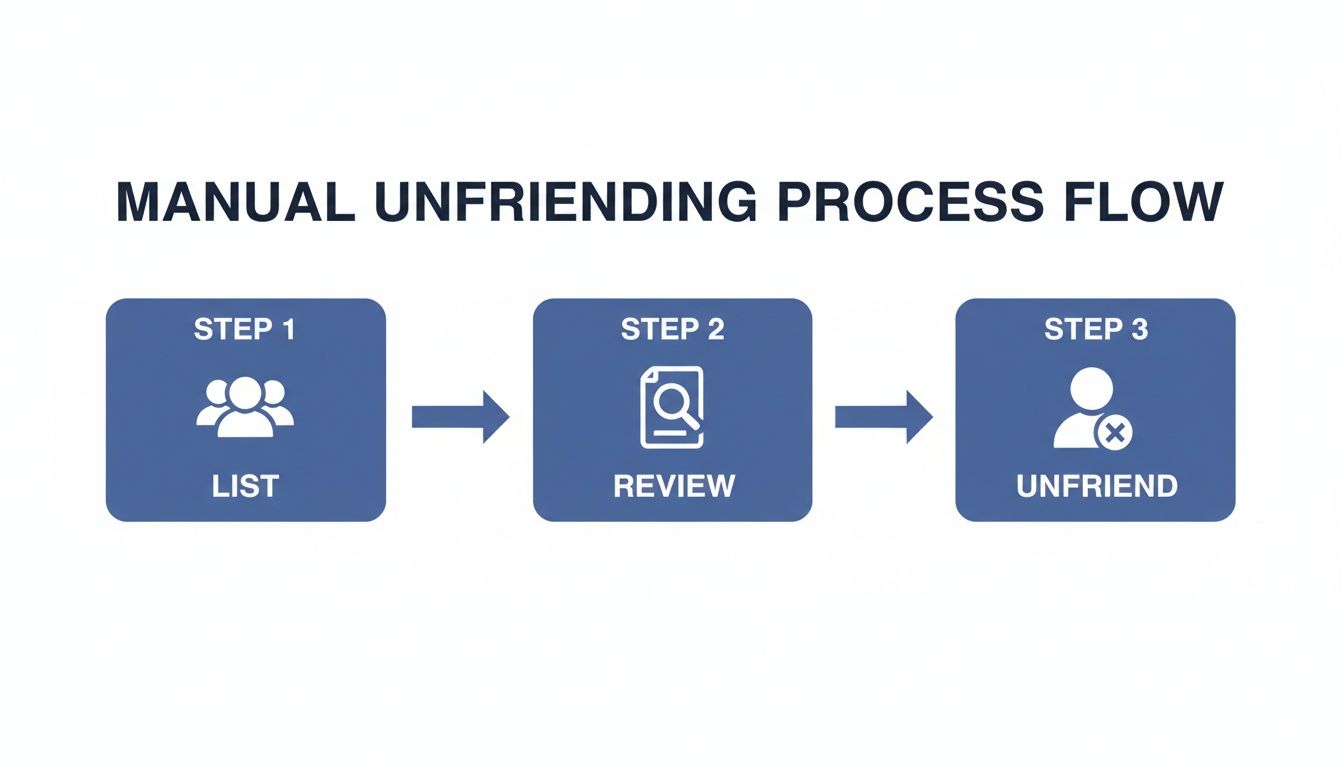
While the manual cycle of listing, reviewing, and unfriending is straightforward, automating it saves an incredible amount of time and prevents you from accidentally removing the wrong person.
The most important feature, by far, is the Whitelist. This is your safety net. Before the automation begins, you can add key clients, colleagues, family, and other important connections to this protected list. The tool will never touch anyone on your whitelist, which gives you complete peace of mind. For a closer look at this strategy, check out our guide on how to clean your inactive friends list.
Using an intelligent tool turns a dreaded chore into a smart marketing move. It lets you quickly and safely refine your audience, making sure your message actually reaches the people who are most likely to engage, convert, and help your business grow. You can find more tips on managing your friend list and improving your organic reach in our other guides.
Deciding to do a major cleanup of your Facebook friends list is a big step, and it's totally normal to have a few questions before you dive in. Getting it right from the start saves a lot of headaches later.
Let's clear up some of the most common things people worry about.
This is probably the biggest concern, and for good reason. Yes, your account can absolutely get flagged or temporarily blocked.
If you start manually unfriending hundreds of people in one go, you’re going to look like a spambot to Facebook's algorithm. That kind of rapid, unnatural activity is a major red flag, and it can land you in Facebook jail. For a business owner, that's downtime you just can't afford.
This is exactly why pacing yourself is so important if you're doing it by hand. A better, safer approach is to use a smart tool built to work within Facebook's limits, mimicking how a real person would act.
Here’s some good news: you can put this worry to bed.
Facebook does not send any kind of notification when you unfriend someone. It’s a quiet, one-sided action. They won’t get a ping or an alert.
The only way they'd figure it out is if they went looking. They might happen to visit your profile and see the "Add Friend" button where "Friends" used to be, or maybe they’d eventually notice your posts haven't shown up in their feed for a while.
For a professional, this is perfect. It allows you to carefully curate your audience and refine your network without causing any awkward social friction or needing to explain yourself.
This is a massive benefit for coaches, marketers, and anyone who relies on a professional network. For a deeper dive into all the little details, check out our guide on what happens when you unfriend someone on Facebook.
Once you click that "Unfriend" button, it's a done deal. The connection is gone, and there's no "undo" button or magic recycle bin to bring them back.
If you change your mind, you have to go through the whole process again by sending a new friend request. This is precisely why a thoughtful, deliberate approach is so critical. If you're using a tool to help with the process, using its whitelist feature to protect your key clients, collaborators, and close friends isn't just a good idea—it's essential.
Knowing when to unfriend versus when to block is crucial for managing your online space effectively. They are very different tools for very different situations.
Unfriending: Think of this as simply severing the connection. You're no longer "friends," so they won't see your friends-only content. However, they can still view anything you've shared publicly. This is the go-to option for cleaning up your list of inactive or irrelevant contacts.
Blocking: This is the digital equivalent of a locked door. When you block someone, they can't find your profile, send you messages, or even see your public posts. It's a complete communication cutoff.
For the kind of strategic cleanup we're talking about—aimed at improving engagement and focusing your audience—unfriending is the right move. Save blocking for those rare cases where you have a real privacy or safety concern.
Ready to clean your friends list the smart, safe, and automated way? FriendFilter gives you the tools to identify inactive friends and remove them without risking your account. Start your free 14-day trial today and see the difference an engaged audience makes. https://friendfilter.com
