Learn how to auto friend request on Facebook the right way. This guide covers safe automation, network growth, and avoiding common pitfalls.
FriendFilter scans your Facebook and shows exactly who's inactive — so you can clean up and boost your reach.
Sending a friend request on Facebook seems simple enough, but when you're using your profile to grow your business, it's a numbers game that can eat up your entire day. Let's talk about auto friend requests. When done right, it isn't about spamming people. It’s about strategically scaling your outreach so you can focus on what actually matters: building real relationships.
This isn't just about clicking a button; it’s about transforming a mind-numbingly repetitive task into an efficient system for connecting with the right people.
If you're a coach, marketer, or small business owner using your personal Facebook profile for lead generation, you know the drill. You spend hours manually searching for prospects in groups, vetting profiles one by one, and sending out requests. It’s important work, but it’s a massive time sink that pulls you away from creating content, serving clients, and actually running your business.
This is exactly where smart automation changes the game.
Forget the old idea of spamming random strangers. This is about creating a targeted, consistent outreach process that hums along in the background. Think of it as your own virtual assistant, tirelessly connecting you with potential clients who have engaged with specific posts or are members of your target groups. It’s like warming up your audience 24/7, even while you sleep.
The single biggest win from automating this process is getting your time back. When you automate that initial connection, you can finally shift your focus to the high-value activities that actually build your brand and drive sales.
With a smart automation strategy, you can:
I get it—a common fear is getting your account flagged or banned. The critical difference here comes down to your intent and your method. Spam is blasting out hundreds of untargeted, generic requests and hoping something sticks.
Smart automation is the opposite. It’s a careful, measured process designed to mimic natural human behavior. It’s always about quality over quantity.
Key Takeaway: The goal isn't just to add more friends; it's to add the right friends. Effective automation starts with a crystal-clear understanding of who you're trying to reach. If you haven't nailed that down yet, our guide on how to identify your target audience is the perfect place to start.
It's interesting to look back at how things have changed. A 2012 Pew Research Center study found that a staggering 80% of initiated friend requests were accepted, with people adding about seven new friends a month. While the platform is different now, it shows just how easily a friends list can get bloated with unengaged contacts, which can absolutely crush your organic reach.
That's why a strategic, automated approach—paired with regular list clean-ups—is so crucial for maintaining a healthy and effective Facebook presence today.
Getting started with automation can seem a little intimidating, but kicking off your first campaign is actually pretty straightforward. This is your step-by-step guide to ditching the manual grind and setting up a smart system that adds the right people to your network, predictably. It’s how you get back hours every single week.
The whole point is to do this safely by mimicking natural human behavior. That way, you can connect with potential clients without setting off any alarms. We'll walk through finding your audience, dialing in the right settings, and launching a campaign that works for you in the background.
This flow chart nails the core concept: shifting from time-consuming manual work to an efficient, automated process.
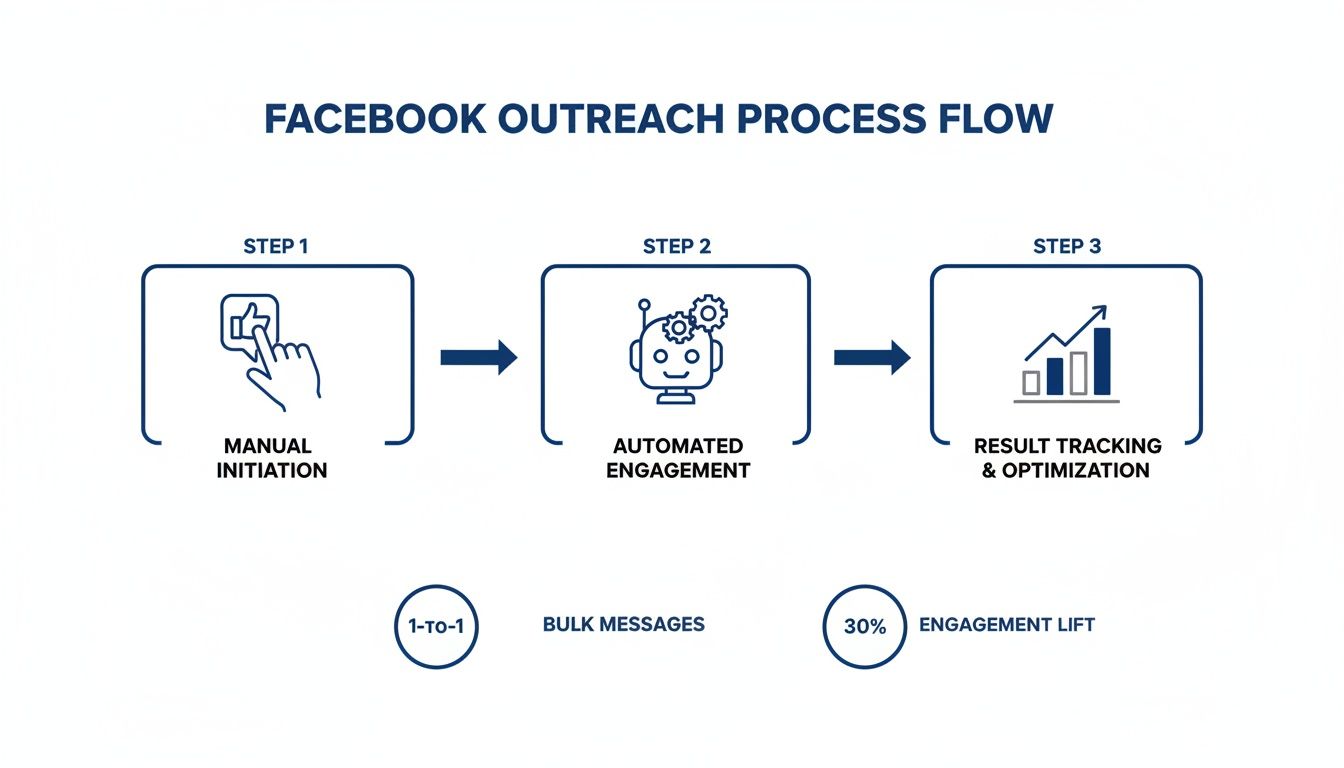
As you can see, automation takes over the most repetitive part—sending requests—which frees you up to focus on what really matters: building relationships with the new people you connect with.
Let’s be clear: the success of any auto friend request on Facebook campaign comes down to one thing—targeting. Spraying requests to random people is just spam, and it won’t get you anywhere. The real strategy is sending requests to a hand-picked list of people who have already signaled interest in what you do.
So, before you touch a single setting, you have to know where your ideal clients hang out. Are they active in certain Facebook groups? Do they consistently like and comment on posts from key influencers in your industry? That’s where you need to be.
Here are a few of the best places to find high-quality prospects:
A deep understanding of your audience is non-negotiable before you launch anything. Tools like Facebook Audience Insights are incredibly useful for digging into demographics and interests, making sure your automated requests land with the right people from the get-go.
Once you’ve found a solid source—like a group’s member list or the engagement on a post—you're ready for the next step. This is where a tool like FriendFilter comes in to do the heavy lifting.
Getting this set up is as simple as installing the FriendFilter Chrome extension. Once it’s on, you just navigate to your target audience on Facebook, and the tool’s options will appear right over the top of the page. It feels surprisingly intuitive because you’re still working within the familiar Facebook interface.
The tool overlays a clean dashboard where you select your audience and tweak the automation settings. It’s all designed to put you in control, with a major focus on safety and efficiency.
Let's dig into the most important settings to get your campaign up and running without any hiccups.
This is, without a doubt, the most critical part of the setup. Going too fast is what gets accounts flagged. Smart automation is all about looking human, and the keys to that are randomized delays and sensible daily caps.
Randomized Delays: Instead of sending a request every 60 seconds on the dot, a good tool will randomize the timing. It might wait 55 seconds, then 72, then 61. That kind of variability looks completely natural to Facebook’s algorithm. A good starting range is between 60 and 120 seconds between each request.
Daily Limits: Please, don't try to send hundreds of requests on day one, especially if your account is new or hasn't been used for outreach before. You have to start slow and build momentum.
I also recommend running the automation for just a few hours each day, not 24/7. This simulates a real person who logs on, does some networking, and then logs off. Once you’ve set your delays and limits, you just hit "Start," and the tool gets to work. The best part? You can close the tab and get back to your day—it will keep running safely in the background.
Using automation to send an auto friend request on Facebook is a huge time-saver, but let's be real: you have to be smart about it. The entire goal is to fly under the radar by acting like a human, not a bot that triggers Facebook's spam filters. This is my personal playbook for keeping your account safe, in good standing, and far away from the dreaded "Facebook jail."
I always tell people to think of their Facebook account like a car. You wouldn't floor it from a cold start; you'd let the engine warm up. The same logic applies here. Going from zero to sending 100 requests on day one is the fastest way to get your account restricted. Slow, steady, and strategic is the only way to win this game long-term.
Before you even think about scaling up your outreach, you need to "warm up" your account. This is non-negotiable, especially if your account is new or you haven't been sending many requests manually. Warming up just means gradually increasing your activity over time so Facebook sees a history of normal, human-like behavior.
A solid warm-up plan looks something like this:
This slow ramp-up period shows Facebook that your increased activity is organic, not a bot gone wild. It’s a little bit of patience upfront that pays off massively in account security later.
Your success isn't just about the volume of requests you send; it's about how many people actually accept. A high acceptance rate sends a positive signal to Facebook. A low one, on the other hand, looks spammy and can put your account at risk.
Your personal profile is your digital first impression. When someone gets a request from you, the very first thing they do is click on your name to see who you are. Does your profile look like a real, trustworthy person, or does it scream "sales pitch"?
Pro Tip: Your profile photo should be a clear, friendly headshot—not a logo. Use your cover photo to communicate what you do or who you help. Your bio should be a short, benefit-driven statement. Make it instantly obvious you're a real person worth connecting with.
A well-optimized profile can easily double your acceptance rate. This not only grows your network faster but also strengthens your account's good standing with the algorithm.
One of the most common mistakes I see people make is leaving their automation tools running around the clock. Think about it: no real person is on Facebook sending friend requests at 3 AM on a Tuesday. That kind of constant activity is a massive red flag.
Instead, operate in "work sessions." Run your automation for a few hours in the morning and maybe for another couple of hours in the afternoon. This pattern perfectly mimics how a real marketer or business owner would actually use the platform. It's realistic, safe, and incredibly effective.
Tools like FriendFilter are designed to work in the background, but that doesn't mean they should be on 24/7. Use it strategically during peak hours when your ideal connections are online, then give it a rest. This simple habit is one of the most powerful ways to protect your account. For those curious about other growth methods, our guide exploring if you should buy Facebook friend requests offers a deeper look at alternative strategies.
Finally, as your network grows and you start cleaning up your friends list to boost engagement, you need a safety net. You absolutely do not want to accidentally unfriend a high-value client, a business partner, or your mom.
This is where a Whitelist feature is a lifesaver. A whitelist is simply a protected list of contacts that your automation tools will never touch. Before you run any un-friending or cleanup processes, take five minutes to add your most important connections to this list.
I always recommend whitelisting:
This simple step ensures that while you're efficiently clearing out inactive contacts to improve your reach, your most valuable relationships stay perfectly safe. It’s a simple preventative measure that saves you from major headaches down the road.
Sending an auto friend request on Facebook is a great way to get people in the door, but let's be real—that’s just the first step. A friends list with 5,000 people is completely useless if only 50 of them ever see your posts. The real magic happens when you turn that growing network into an active, engaged audience that actually sees and reacts to your content.
It's a classic mistake. Marketers get obsessed with adding new people but completely forget to nurture the connections they already have. Before they know it, they're left with a bloated friends list full of "ghost" accounts that are actively killing their organic reach.
You have to understand how the Facebook algorithm thinks. When you share something new, it doesn't show it to everyone. It starts by testing the waters with a small group of your friends. If those people start liking, commenting, and sharing, the algorithm gets the message: "This is good stuff," and pushes it out to a wider audience.
But what if that initial test group is full of people who haven't logged in for six months? Crickets. Your post gets zero engagement. The algorithm sees this and assumes your content is a dud, shutting down its reach before it ever had a fighting chance.
This is why a smaller list of highly engaged people is infinitely more valuable than a massive, silent one.
So, how do you sort the active fans from the silent observers? You could try to do it by hand, but that’s a nightmare. It means scrolling through thousands of profiles, trying to guess who last liked a post. It's just not practical.
This is where you need a proper analytics tool. Something like FriendFilter can sync with your account and give you a crystal-clear dashboard of who is actually paying attention. It looks at your posts over a specific timeframe—say, the last 30 or 60 days—and scores each friend based on their likes and comments.
This data instantly sorts your friends list into a few critical buckets:
Once you know who the inactive friends are, it's time to do some strategic housekeeping. This isn’t about being ruthless; it's about being smart. By removing these non-engaged contacts, you’re basically curating an audience that genuinely wants to be there.
The impact is immediate and powerful. The next time you post, the algorithm’s initial test group will be full of people who are far more likely to engage. That sends a huge positive signal, boosting your post's visibility to everyone else. I’ve seen coaches double or even triple their organic reach just from doing a thorough cleanup.
Key Takeaway: Regularly cleaning your friends list is like pruning a plant—you remove the dead weight so the healthy parts can flourish. This tells Facebook your content is valuable, which gets you better visibility with the people who actually matter. For a step-by-step walkthrough, check out our complete guide on how to manage your Facebook friend list for maximum impact.
Of course, a clean list is only half the battle. You also need to post content that invites interaction from your newly-tuned audience. Just broadcasting your offers isn't going to cut it.
Your job is to turn passive scrollers into active participants.
Here are a few simple content plays that work like a charm for our clients:
When you combine a clean, engaged list with content that starts conversations, you create a powerful flywheel. More engagement gets you more reach, which brings more engaged people into your world, turning those new automated connections into real leads.
Sending out automated friend requests is just the first step. The real magic happens when you know what’s actually working. If you're not tracking your efforts, you're essentially flying blind. This is how you shift from just adding random connections to building a predictable system for growing your audience and your business.
Think about it like this: you wouldn't pour money into a paid ad campaign without obsessively checking your click-through rates and cost per lead, right? Your organic outreach deserves that same level of attention. When you dig into the data, you can stop wasting time on outreach that falls flat and start doubling down on what truly attracts your ideal clients.
To get a real feel for how your automated outreach is performing, you have to look past the simple vanity metric of your total friend count. The numbers that truly matter tell a story about the quality of your new connections and how much they actually care about what you have to say.
Here are the essential metrics to keep an eye on inside your FriendFilter dashboard:
Numbers on a screen are useless unless you act on them. Once you start tracking these metrics, you'll uncover some incredibly powerful insights that can steer your entire Facebook marketing strategy. You'll quickly notice clear patterns emerging.
For instance, you might find that requests sent to members of "Marketing Masterminds for Coaches" get a whopping 60% acceptance rate, while requests sent to "General Small Business Owners" barely crack 20%. That’s a crystal-clear signal to pour all your energy into that first group.
Or maybe you notice that new friends love it when you ask questions but completely ignore your more promotional posts. This data becomes your roadmap for content creation, helping you fill your calendar with stuff that actually sparks conversations and builds relationships.
My Personal Tip: Don't just check these numbers once a month. I recommend a quick weekly check-in. It only takes five minutes to glance at your acceptance rate and see who your most engaged new friends are. This regular pulse check lets you make small, consistent tweaks that compound into massive results over time.
Once you've got a baseline, it's time to start optimizing. "A/B testing" sounds technical, but it’s really just about changing one small thing at a time to see what moves the needle. This is how you take good results and make them great. For more ideas, our guide on increasing your Facebook reach is packed with more tactics.
Here’s a simple A/B testing plan you can start today:
By constantly testing and refining, you stop just "doing the work" and start building an intelligent, data-driven growth machine. This is how you create a predictable flow of ideal clients and turn your Facebook profile into one of your most reliable business assets.
Jumping into Facebook automation brings up a lot of valid questions. You want to know what's safe, what's effective, and what's just hype. Let's get straight to it and tackle the most common concerns I hear from marketers and coaches every day.
The short answer is yes, but with a huge caveat: you have to do it the right way. The whole point is to mimic how a real person would behave, not to act like a spam bot.
A safe tool is designed to work with Facebook's systems, not against them. It does this by adding randomized delays between actions and staying well within the platform's unofficial limits. Any tool promising you 500 new friends in a day is a one-way ticket to getting your account restricted. Think of it as putting a tedious, manual task on autopilot—not blasting out requests indiscriminately.
If you start slow, warm up your account, and avoid running any automation 24/7, you can significantly reduce the risk while clawing back a ton of your time.
This is the big one, and the honest truth is, there's no single magic number. Facebook doesn't publish an official limit because the real "safe" number depends on your specific account—its age, activity history, and how many of your requests are actually being accepted.
That said, here are some solid, field-tested benchmarks to follow:
My Two Cents: A good tool like FriendFilter will have safety features baked right in to help you manage these limits automatically. Always, always prioritize the long-term health of your account over a quick, risky burst of growth. It's just not worth it.
It absolutely does. In fact, it's probably one of the most overlooked hacks for boosting your organic reach on a personal profile.
Here's why it works: when you make a post, Facebook's algorithm shows it to a small slice of your friends first to see how they react. If that initial group is packed with inactive accounts—people who haven't logged in for months—your post gets crickets. No likes, no comments, nothing.
The algorithm sees that lack of engagement and assumes your content is a dud, so it buries it. Your reach is dead on arrival.
When you consistently clear out those "ghost followers," you're making sure your posts are shown to an initial audience of real, active people who are much more likely to engage. That sends a strong positive signal to the algorithm, which then shows your content to a much wider audience. For a deeper dive, our guide on how to identify inactive Facebook friends walks you through the entire process.
Ready to turn your Facebook profile into a reliable source of leads and engagement? FriendFilter gives you the tools to automate your outreach safely, see who your most engaged followers are, and clear out the inactive friends who are dragging down your reach.
Start your free 14-day trial of FriendFilter today and see the difference for yourself.
